> For the complete documentation index, see [llms.txt](https://infinitypbr.gitbook.io/magic-pig-games/llms.txt). Markdown versions of documentation pages are available by appending `.md` to page URLs; this page is available as [Markdown](https://infinitypbr.gitbook.io/magic-pig-games/projectile-factory/projectile-factory-documentation/projectile-spawner.md).
# Projectile Spawner
v1.0
This is a **thing that spawns** [**Projectiles**](/magic-pig-games/projectile-factory/projectile-factory-documentation/projectile.md). It could be a gun or other object, it could be something like a turret in your game, or it could be a virtual object on your player character which can spawn all sorts of projectiles.
Add a `ProjectileSpawner` component to the object you wish to spawn projectiles.
{% content-ref url="/pages/469MKBkIZoZWQmnUwGY1" %}
[Add Projectile Factory & Create a Projectile Spawner](/magic-pig-games/projectile-factory/overview-and-quickstart/quick-start-guide/add-projectile-factory-and-create-a-projectile-spawner.md)
{% endcontent-ref %}
The Demo "Actor" from the Sci-Fi Arsenal integration
The custom inspector organizes the Projectile Spawner options into a few categories. Toggle on the "Show Help Boxes" option to see more details inside the Inspector.
## Setup
This is where we set up all the required and some optional settings.
### Collision Mask
The Projectiles spawned by this Spawner will interact with the layers you select here. Each Projectile can override this layer as well, though in most cases, we expect you would not override the value set on the Spawner.
### Target
This is the target which Projectiles will inherit at spawn. You can update this at runtime as well.
While each projectile will inherit the target when they are created, the projectiles can individually have their targets updated while they are active.
### Projectiles
This is the list of available projectiles. You need to have at least one projectile. Check the [**code**](/magic-pig-games/projectile-factory/projectile-factory-documentation/projectile-spawner/projectile-spawner-code.md) for details on how to set the active projectile, and replace projectiles in the list with new ones.
### Observers
The [**Observers**](/magic-pig-games/projectile-factory/projectile-factory-documentation/observers-global-observers-and-observer-objects.md) you add here will be copied to all projectiles created by this Spawner. This enables new hooks for your project.
{% hint style="info" %}
In the demo scenes, the `Demo Actor Observer` is included, which enables the player `Actor` to know whenever one of their projectiles collides with a target. This is how damage is sent from the player `Actor` to the target `Actor`.
There are multiple ways to hook into the **Projectile Factory** code -- you may wish to use the [**Events**](/magic-pig-games/projectile-factory/projectile-factory-documentation/events.md) to handle damage connections instead.
{% endhint %}
### Spawn Points
Each **Projectile Spawner** can have any number of **Spawn Points**. Each point includes the transform of the "spawn point" itself, as well as a rotating and tilting transform, which may be utilized by some of the [**Spawn Behaviors**](/magic-pig-games/projectile-factory/projectile-factory-documentation/spawn-behavior.md).
If you have more than one **Spawn Point**, use a [**Spawn Point Manager**](/magic-pig-games/projectile-factory/projectile-factory-documentation/spawn-point-manager.md) class to control how the **Spawn Points** are selected. This provides a tremendous amount of control in order to create any kind of spawning behavior you'd like.
## Trajectory
### Default Trajectory Behavior
Each spawner can include a default [**Trajectory Behavior**](broken://pages/5oJ1xkiPJIVjpO2fhyGJ) to used when the trajectory is active. Individual Projectiles can override this, which is useful when the Projectile behavior is more unique.
{% hint style="success" %}
**Trajectories** are an important player experience for many games, and provide a lot of information to the player. **Projectile Factory** ships with a number of game-ready trajectories, but you may wish to create your own, to provide your players the best experience for your project.
{% endhint %}
### Show Without Projectile
When true, the Trajectory will show even if no projectile is currently selected in the spawner.
### Runtime Values
These values are set at runtime.
#### Always Show Trajectory
When true, the trajectory will always show.
#### Show Trajectory
When true, the trajectory should show.
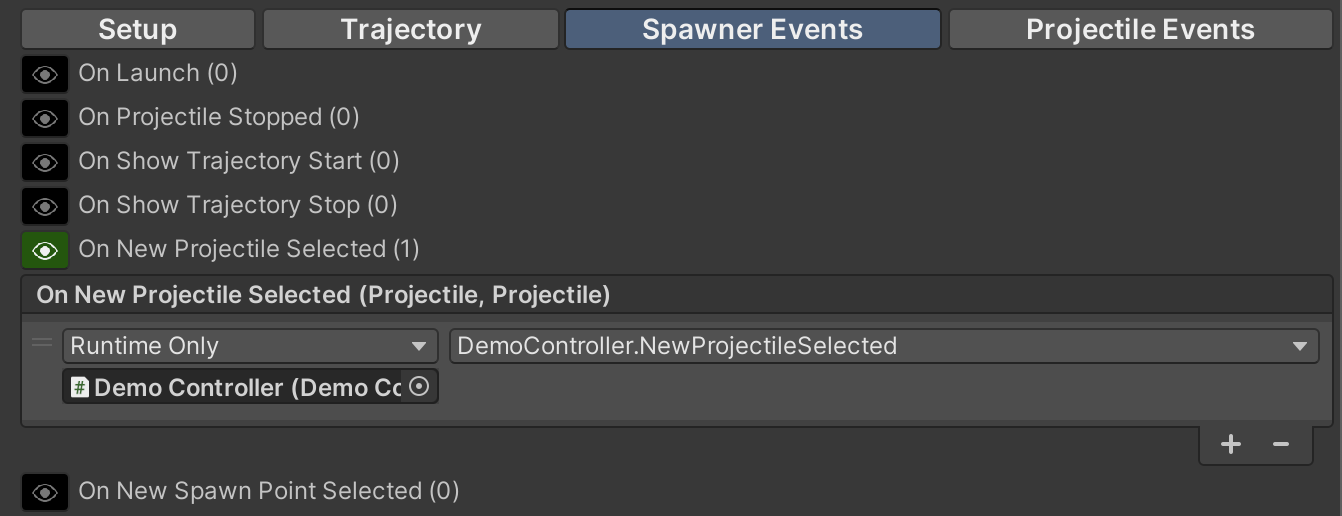
The Demo Spawner uses OnNewProjectileSelected to enable continuous shooting if the mouse button is still pressed.
## Spawner Events
These `UnityEvents` are called throughout the **Projectile Spawners** lifecycle. Use these to hook into the Projectile Factory system from your classes.
{% hint style="success" %}
The Demo Controller use the `OnNewProjectileSelected` event. If the "fire" button (mouse button in the demo) is down when this event is triggered, the controller will initiatiate the "Spawn" immediately, which allows for continuous firing even while the projectiles change.
{% endhint %}
### `OnLaunch`
Called whenever the Projectile Spawner starts the `Launch` coroutine. This is not called for each individual projectile that is spawned. Use the **Projectile Events** for that.
### `OnProjectileStopped`
This is called when the `Launch` coroutine is stopped.
### `OnShowTrajectoryStart`
This event is called whenever the Trajectory starts to show.
### `OnShowTrajectoryStop`
This event is called whenever the Trajectory stops showing.
### `OnNewProjectileSelected`
Whenever a new projectile is selected, this event will be called. This event has a `` signature, which includes the **New Projectile** and the **Old Projectile** (in that order).
### `OnNewSpawnPointSelected`
This is called whenever a new Spawn Point is selected. This event has a `` signature, which includes the **New Spawn Point** and the **Old Spawn Point** (in that order).
## Projectile Events
These events are called ***from the Projectile*** during the lifecycle of the projectile.
{% hint style="success" %}
**Projectiles** can not directly have `Unity Events` added from in-scene objects. Instead, add them here on the **Projectile Spawner**. The events will be copied to each projectile when the projectile is spawned.
{% endhint %}
### Projectile On Launch (`OnLaunch`)
Called when the projectile is launched.
### `OnProjectileStopped`
This is called when the **Projectile Spawner** assigned to this **Projectile** stops firing.
### `OnReturnToPool` & `OnGetFromPool`
These are called when the projectile is returned to the pool or retreieved from the pool respectively.
### `OnCollisionEnter` & `Exit`, `Stay`
The collision events pass in the projectile, as well as the `Collision`, the `GameObject` collided with, and the `Vector3` point of contact. Note that depending on how the collision was triggered, those values may be `null` or `default`.
### `OnTriggerEnter` & `Exit`, `Stay`
The trigger events pass in the projectile, as well as the `Collider`, the `GameObject` collided with, and the `Vector3` closest contact point. Note that depending on how the trigger was triggered, those values may be `null` or `default`.
### `OnDoDestroy`
This is called when the **Projectile** is destroyed via the `InvokeDestroy` method on `Projectile.cs`.
### `OnDoEnable` & `OnDoDisable`
These are called when the `DoEnable` and `DoDisable` methods are called. They may be called from the normal `OnEnable` and `OnDisable` methods, or via other mechanisms.
### `OnReset`
This event is called at the end of the `ResetProjectile` method. While this method may be called in other ways, `ProjectilePoolManager` will call this during the `ReturnProjectile` cycle -- this is when the projectile is being put back into the pool.
### `OnProjectileSpawnerSet`
This event is called when the assigned `ProjectileSpawner` is set via the `SetProjectileSpawner` method. This happens at the start of the lifecycle, but may also happen if you proactively change the assigned `ProjectileSpawner`.
{% content-ref url="/spaces/-MY3N\_li2jPq7az6mYfq/pages/pzF6HXDS8jhHJyI1n4WJ" %}
[Projectile Spawner Code](/magic-pig-games/projectile-factory/projectile-factory-documentation/projectile-spawner/projectile-spawner-code.md)
{% endcontent-ref %}