# Magic Time for Projectile Factory

{% hint style="success" %}
Install the **Projectile Factory Magic Time Integration** package after both [**Projectile Factory**](broken://pages/9DRf9z50Dep5PcIz0NZD) and [**Magic Time**](broken://pages/hlYGqP9mEYDbmgzVLrzB) have been installed.
{% endhint %}

<figure><img src="/files/VpwozsFgQexCLuzV7wFQ" alt=""><figcaption><p>The projectile (and characters) pass through a "Time Scale Zone", slowing them down.</p></figcaption></figure>

## Turn Projectiles into Magic Time Users

Add the `MagicTimeProjectile` component to your Projectile objects. This class inherits from [`MagicTimeUser`](/magic-pig-games/magic-time-local-time-scale/magic-time-user.md) and has all the methods that brings.

<figure><img src="/files/dUPDSXUeSPq6zdoxIkBv" alt=""><figcaption><p>Here, we see the Projectile will subscribe to the "Global" LocalTimeScale. It will also have it's own LocalTimeScale.</p></figcaption></figure>

{% hint style="info" %}
You can always create a new class which inherits from `MagicTimeProjectile` if you'd like to add any custom logic for your project, including any interactions with custom [**Behaviors**](/magic-pig-games/projectile-factory/projectile-factory-documentation/behaviors.md) you may have created.
{% endhint %}

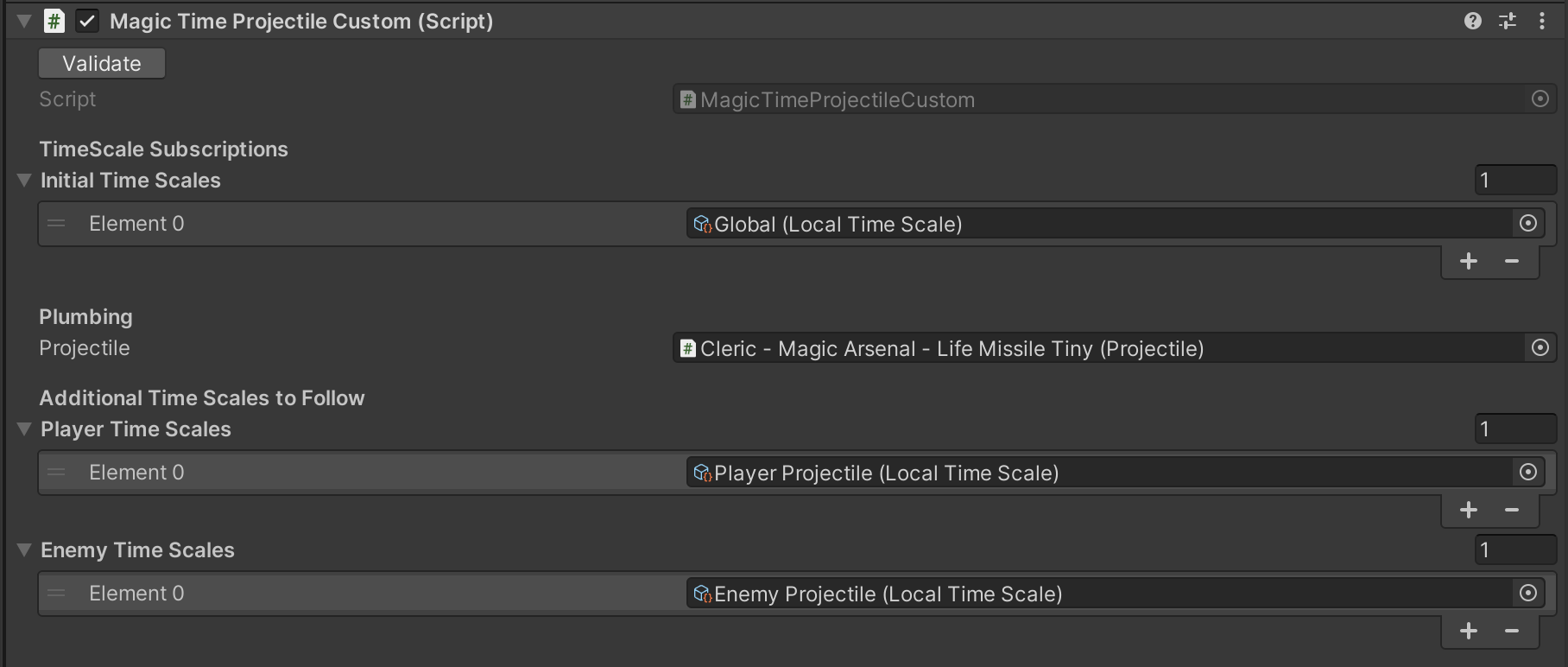
<figure><img src="/files/Z01eBdPHQXfhpTWRNWMV" alt=""><figcaption><p>This is a custom class which inherits from <code>MagicTimeProjectile</code>. It has additional logic allowing the projectile to subscribe to additional <code>LocalTimeScale</code> objects, in this case depending on whether it is an "Enemy" or "Player" projectile.</p></figcaption></figure>

## Set Up Projectile Data

Each Projectile has a [`ProjectileData`](/magic-pig-games/projectile-factory/projectile-factory-documentation/projectile/projectile-data.md) object on it, which can be customized. This also has the "speed" value for the Projectile. The integration comes with `MagicTimeProjectileData` which will calculate speed using the value set modified by the Magic Time values.

Create a new Projectile Data object of this type by right-clicking in your project and choosing `Create/Projectile Factory/Projectile Data/Projectile Data for Magic Time`

Be sure to set the values you'd like, and then populate your Projectiles with this Projectile Data object.

{% hint style="success" %}
For "Damage over Time" projectiles, this will also override those, allowing you to perform damage over time instead of straight values, if you choose. The "over time" will be computed using the `MagicTimeProjectile.CombinedTimeScale()` value.
{% endhint %}

## Add Additional Components

Your **Projectiles** may have many different types of components on them -- they probably have a `ParticleSystem`, but they may also have audio, lighting, or other systems. You can add additional components to your Projectile object which handle the time / speed management of these various components.

### Magic Time User Destroy Or Pool Object

The original `DestroyOrPoolObject` component will send an object back to the pool after a set amount of time. The new version, `MagicTimeUserDestroyOrPoolObject` will do the same thing, but will take into account the objects `TimeScale`, so that it doesn't get destroyed too soon.

### Magic Time User Particle System

The `MagicTimeParticleSystem` component will gather all `ParticleSystems` that are on this Projectile, and set their simulation speed to match the `CombinedValue()` of the `GameTimeUser` object. This way as the object speeds up and slows down, the particle system effects will as well.

{% hint style="success" %}
These components below will connect to the `MagicTimeUser` component on the `MagicTimeUserParticleSystem`, and use the time values from that. They can also be used outside of this, with any `MagicTimeUser` component.
{% endhint %}

### Magic Time User Trail Renderer

Add the `MagicTimeUserTrailRenderer` component  to handle any `TrailRenderer` components on the projectile.

### Magic Time User Audio Source

Add the `MagicTimeUserAudioSource` component to automatically adjust the pitch of audio clips on the Audio Source. This will cache the starting pitch values, so should really be used only for Audio Sources that do not have dynamic clips.

{% hint style="info" %}
There is also a `MagicTimeUserAudioMixer` component, which you can add on your Audio Mixer, and assign the `MagicTimeUser` value to the user you'd like. Generally this would NOT be a single projectile!
{% endhint %}


---

# Agent Instructions: Querying This Documentation

If you need additional information that is not directly available in this page, you can query the documentation dynamically by asking a question.

Perform an HTTP GET request on the current page URL with the `ask` query parameter:

```
GET https://infinitypbr.gitbook.io/magic-pig-games/projectile-factory/magic-time-for-projectile-factory.md?ask=<question>
```

The question should be specific, self-contained, and written in natural language.
The response will contain a direct answer to the question and relevant excerpts and sources from the documentation.

Use this mechanism when the answer is not explicitly present in the current page, you need clarification or additional context, or you want to retrieve related documentation sections.