> For the complete documentation index, see [llms.txt](https://infinitypbr.gitbook.io/magic-pig-games/llms.txt). Markdown versions of documentation pages are available by appending `.md` to page URLs; this page is available as [Markdown](https://infinitypbr.gitbook.io/magic-pig-games/northstar-nav-and-tracking/overview-and-quickstart.md).
# Overview & Quickstart
The ultimate compass, radar, overlay tracking for Unity
## Radar, Compass, Tracking
**Northstar Tracking System** provides multiple ways to view and track objects in the scene. Combine them, customize them, and override them to produce the look and feel that you'd like for YOUR project.
Use them all, or just the ones you want, and customize them for your game!
## Controls, Tracked Objects, Settings
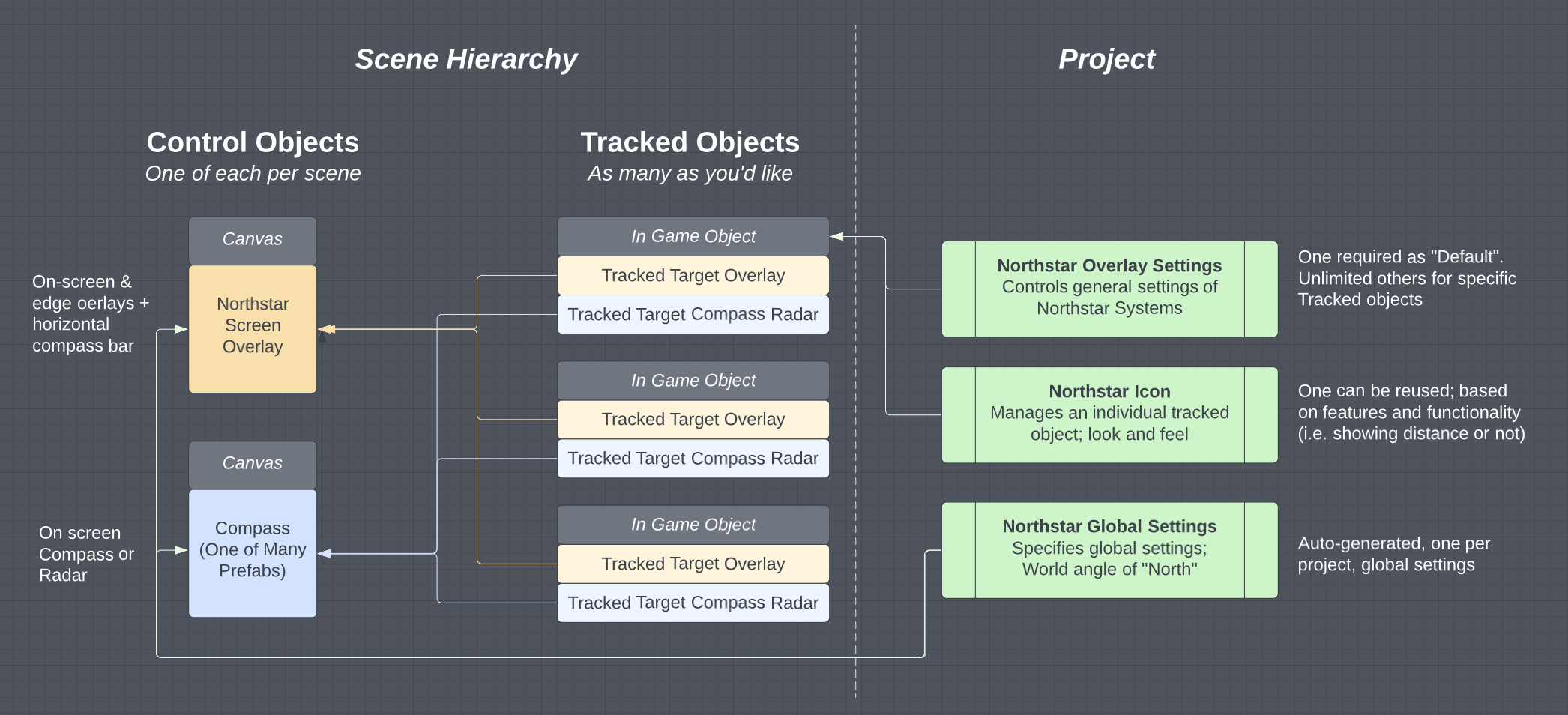
Northstar provides two components you can add to objects you'd like to track -- one handles the [**Compass & Radar**](broken://pages/jS43LM81rRkJAuye43r7), the other handles on-screen overlays including the [**Screen and Edge Overlay**](broken://pages/Clij4Mn4T5xDUU500CJp), and [**Navigation Bar**](broken://pages/E6fkBmpjk9Unh2vdCsCm).
There are two control systems, Scriptable Objects to handle settings, and icon prefabs to drive the specific behavior of individual icons.
Each tracked object can have custom settings, overriding the default look and feel, and be included in or excluded from different types of overlays / tracking.
{% content-ref url="/pages/N7yoKzN8UeebUCDbxtHU" %}
[Broken mention](broken://pages/N7yoKzN8UeebUCDbxtHU)
{% endcontent-ref %}
{% content-ref url="/pages/ulsH68nystWLkc0Rqu6x" %}
[Broken mention](broken://pages/ulsH68nystWLkc0Rqu6x)
{% endcontent-ref %}
{% content-ref url="/pages/VKWUEljcDnbU8CMBjYDa" %}
[Broken mention](broken://pages/VKWUEljcDnbU8CMBjYDa)
{% endcontent-ref %}
{% content-ref url="/pages/xQFZB6UFuzzd6LSmUz2M" %}
[Broken mention](broken://pages/xQFZB6UFuzzd6LSmUz2M)
{% endcontent-ref %}