> For the complete documentation index, see [llms.txt](https://infinitypbr.gitbook.io/magic-pig-games/llms.txt). Markdown versions of documentation pages are available by appending `.md` to page URLs; this page is available as [Markdown](https://infinitypbr.gitbook.io/magic-pig-games/juicy-actions/quick-start-and-demos.md).

# Quick Start & Demos

Simple. Powerful. Fast.

## Key Concepts

<mark style="color:yellow;">**Juicy Actions**</mark> drives <mark style="color:yellow;">**Actions**</mark> with <mark style="color:yellow;">**Action Executors**</mark>.&#x20;

<mark style="color:yellow;">Actions</mark> can do literally anything you'd like, and there are hundreds of <mark style="color:yellow;">Actions</mark> ready to be used. Here's an overview of these concepts, with a quick start guide to get started.

### **Actions**

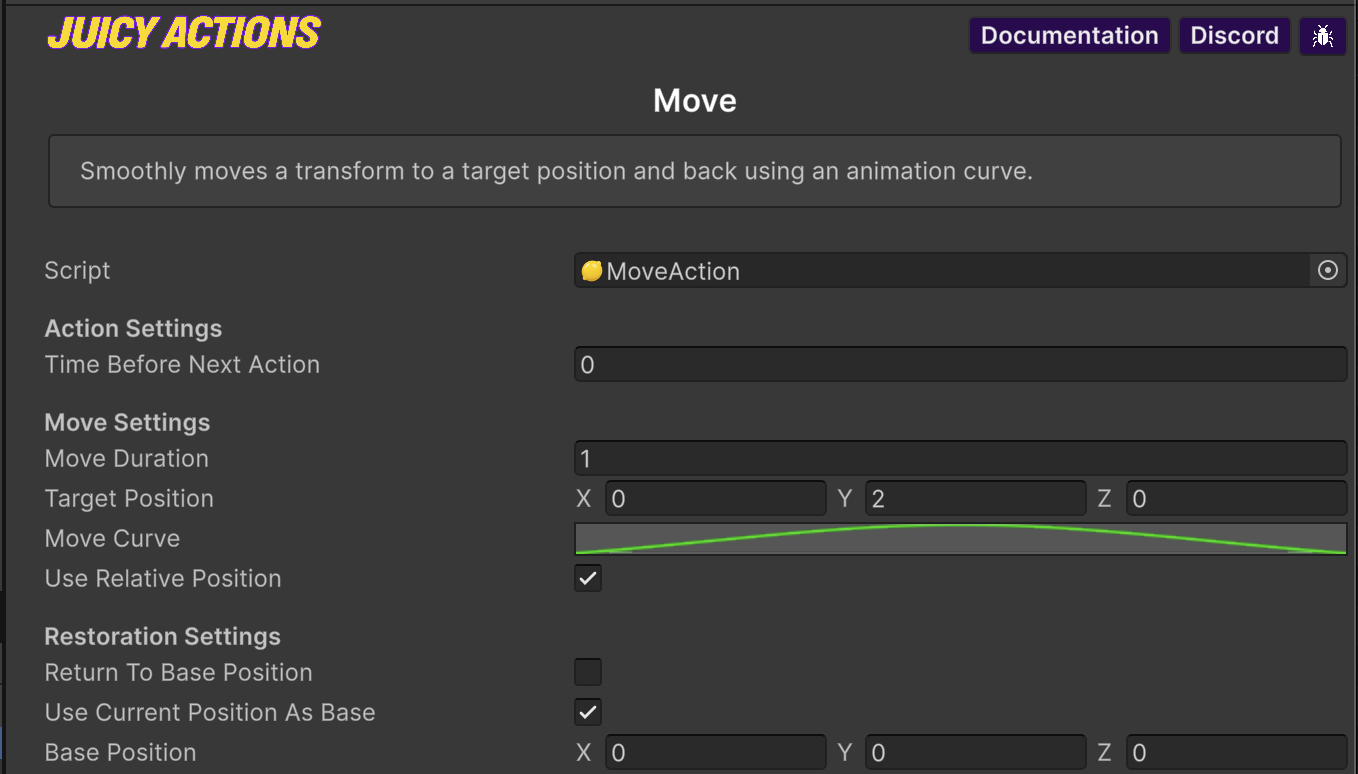
<mark style="color:yellow;">**Actions**</mark> are generally single-operation code that do one thing (optionally to many objects at once). They are <mark style="color:yellow;">**Scriptable Objects**</mark>. Settings can be overridden in the Inspector when used with an <mark style="color:yellow;">**Action Executor**</mark>.

<figure><img src="/files/DZv4s03Nsux7tSooLOMV" alt="" width="563"><figcaption><p>The <mark style="color:yellow;"><strong>Move</strong></mark> action will move a transform over time. This is the Scriptable Object view.</p></figcaption></figure>

{% content-ref url="/spaces/-MY3N\_li2jPq7az6mYfq/pages/wIby5D9DYE3gL9ySBCaN" %}
[Actions](/magic-pig-games/juicy-actions/actions.md)
{% endcontent-ref %}

### Action Executor

The <mark style="color:$success;">`ActionExecutor`</mark> object handles the execution of individual <mark style="color:yellow;">**Actions**</mark> at runtime. Add these to your classes, or use the included [Action On Event](/magic-pig-games/juicy-actions/action-on-events-and-action-runner.md) classes, such as <kbd><mark style="color:$success;">`ActionOnTap`<mark style="color:$success;"></kbd> or <mark style="color:$success;">`ActionOnStart`</mark>.

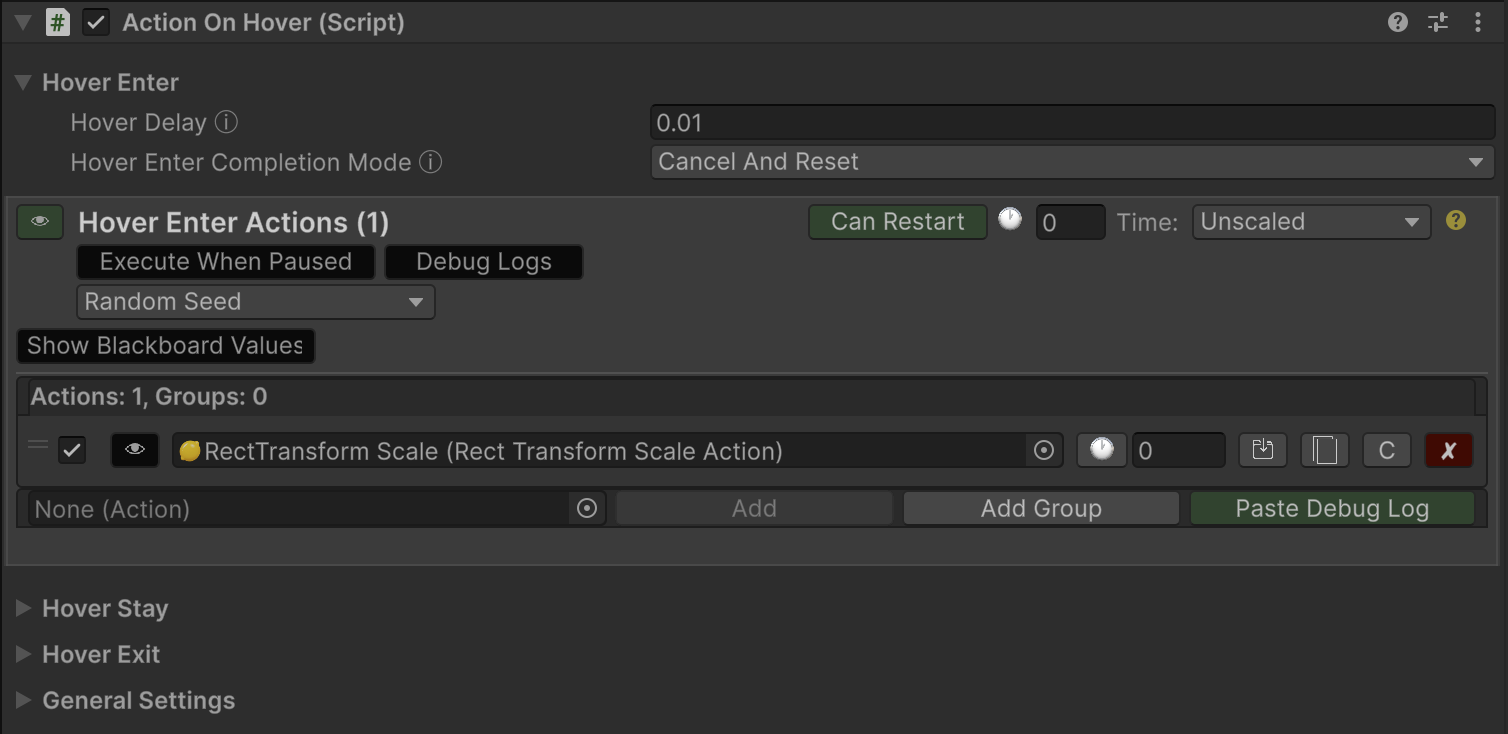
<figure><img src="/files/gfm0N2I4FWxLFaFnnv0o" alt="" width="563"><figcaption><p><mark style="color:$success;"><code>UICard</code></mark> objects in the <mark style="color:yellow;"><strong>Card Match</strong></mark> demo game utilize the <mark style="color:$success;"><code>ActionOnHover</code></mark> component.</p></figcaption></figure>

In this example we see the <mark style="color:yellow;">**Action On Hover**</mark> component with built-in <mark style="color:$success;">`ActionExecutors`</mark> for <mark style="color:$success;">`HoverEnterActions`</mark>, <mark style="color:$success;">`HoverStayActions`</mark>, and <mark style="color:$success;">`HoverExitActions`</mark>. This component quickly enables hover actions for UI elements and in-game objects.

{% hint style="success" %}
Add an <mark style="color:yellow;">**Action Executor**</mark> to any of your classes to execute actions at any time you'd like.

```csharp
public ActionExecutor onHitActions;

public GotHit(int damage){
    onHitActions.Execute(this); // Execute the actions!
    // Other code...
}
```

{% endhint %}

{% content-ref url="/spaces/-MY3N\_li2jPq7az6mYfq/pages/p4BTmWj1wuKodvlY2qhm" %}
[Action Executor](/magic-pig-games/juicy-actions/action-executor.md)
{% endcontent-ref %}

## Quick Start

In [this simple quick start tutorial](/magic-pig-games/juicy-actions/quick-start-and-demos/super-quick-start-tutorial.md), we will quickly add <mark style="color:yellow;">Actions</mark> to objects in a new scene. The video corresponds to the written steps.

{% content-ref url="/pages/uJFMEbcuVpgDHGvMVb0v" %}
[Super Quick Start Tutorial](/magic-pig-games/juicy-actions/quick-start-and-demos/super-quick-start-tutorial.md)
{% endcontent-ref %}

## Follow Along Tutorial

For a more in-depth guide, [in this tutorial](/magic-pig-games/juicy-actions/quick-start-and-demos/third-person-game-tutorial.md) we'll flesh out a more advanced game setup, using <mark style="color:yellow;">Actions</mark>, the <mark style="color:yellow;">Action Blackboard</mark>, and <mark style="color:yellow;">code custom Actions</mark> specific to this project. The video corresponds to the written steps.

{% content-ref url="/pages/OGtuN4ftvPh10vDpQvld" %}
[Third Person Game Tutorial](/magic-pig-games/juicy-actions/quick-start-and-demos/third-person-game-tutorial.md)
{% endcontent-ref %}