> For the complete documentation index, see [llms.txt](https://infinitypbr.gitbook.io/magic-pig-games/llms.txt). Markdown versions of documentation pages are available by appending `.md` to page URLs; this page is available as [Markdown](https://infinitypbr.gitbook.io/magic-pig-games/game-modules-4/module-documentation/quests/quest-rewards.md).
# Quest Rewards
v4.0
**Quest Rewards** are things that they player gets when a **Quest** or **Quest Step** is completed -- either successfully or in failure. (They can be "bad" rewards!!)
## Where are the Quest Reward scripts?
See all included Quest Reward scripts: `Assets/InfinityPBR/---Game Modules/Quests/Scripts - Quest Rewards/`
## How to create a Quest Reward object
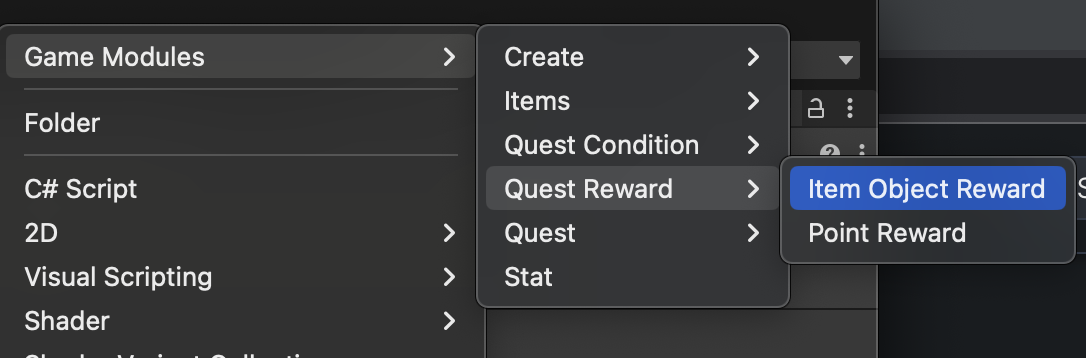
To create a Quest Reward, create folder in your project where you'd like to store your Quest Reward objects. Then right click and choose `Create/Game Modules/Quest Reward/[Quest Reward Type]`
## Create your own Quest Rewards
While the Game Modules ships with many Quest Reward types, and more will likely be added over time, you may want to create your own Quest Rewards. This is very useful when you have unique mechanics and concepts in your project, and you'd like to use those unique things with the Quests module.
While this does require some scripting, it is likely easier than you think!
{% content-ref url="/pages/rVUBtiTP7yLl0N3F6zhZ" %}
[Create a Custom Quest Reward](/magic-pig-games/game-modules-4/module-documentation/quests/quest-rewards/create-a-custom-quest-reward.md)
{% endcontent-ref %}
## Quest Rewards
{% hint style="success" %}
While rewards will often be something of value, like sweet sweet gold, there's much more you can do with them. Give "negative" rewards, for example.
The first quest in the [**Party Based RPG demo game**](/magic-pig-games/game-modules-4/game-module-demo-projects/party-based-rpg.md) gives a reward of -100 gold. This is because to complete the quest, you need to acquire at least 100 gold and then pay off the NPC. Giving a reward of -100 gold takes the gold away from the player. And it's all automatic.
You can also give other things. Give a condition, or an attribute. Give something the player doesn't even know about.
You can use `ItemAttributes` as "accolades", some of which you display to the player, some which you do not. These `ItemAttributes` can inform future quests, levels, and NPC interactions. They can also have lasting impacts on the player.
{% endhint %}
### Common Settings
All Quest Rewards have a Name and Description. The Name will always match the Scriptable Object name -- if you change either, the other will update, when viewing the Inspector.
The Description field is optional, and can provide internal reminders of the reward, or can be used at runtime to populate your UI.
{% content-ref url="/pages/6DaqkUENRfPfdCCR2ftV" %}
[Point Reward](/magic-pig-games/game-modules-4/module-documentation/quests/quest-rewards/quest-reward-details/point-reward.md)
{% endcontent-ref %}
{% content-ref url="/pages/1KHHdx3YdBHZo38OKciW" %}
[Item Object Reward](/magic-pig-games/game-modules-4/module-documentation/quests/quest-rewards/quest-reward-details/item-object-reward.md)
{% endcontent-ref %}